Every now and then I've come across a customer request where they would like to choose which of an entities email address's are used to send an email to the entity (e.g. contact).
So after a lot of experimentation, I've found a reliable way of achieving this. The key is to use a plugin on the pre-event step of the "Send" message (Send Email Message) of the email. I've found that changing the email address to be used before this is unreliable as CRM often overrides the change and re-maps it back to the primary email address.
So, to summarise my example code below:
1) I've added an "new_emailpreference" optionset to the contact entity, which lets you choose which email address is used (emailaddress1, emailaddress2 or emailaddress3).
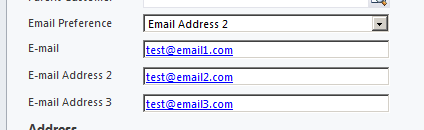
2) I've attached the plugin as a pre-operation step of the email entity to the "Send" message.
3) The Plugin does the following:
- Grabs the email
- Loops through the "to" address (you could easily extend this to include cc and bcc as well), finding those activity parties which map to a contact.
- For each contact found, it retrieves the contact and determines if emailaddress2 or emailaddress3 has been chosen as the preferred email address to be used instead of the default.
- For that activity party, it then changes the "addressused" property to the chosen email address and updates the email record.
4) When the email gets sent via Outlook or via the Email Router, the email address that is used in the "To" address is set correctly to the email address that was chosen.


Here's the code....Note that it's for CRM 2011, however the code for CRM 4 is very similar and all the fields are the same..
using System;
using System.Collections.Generic;
using System.Linq;
using System.Text;
using Microsoft.Xrm.Sdk;
using Microsoft.Xrm.Sdk.Query;

namespace ExamplePlugin
{
    public class Plugin : IPlugin
    {
        public void Execute(IServiceProvider serviceProvider)
        {
            IPluginExecutionContext context = (IPluginExecutionContext)serviceProvider.GetService(typeof(IPluginExecutionContext));
            IOrganizationServiceFactory factory = (IOrganizationServiceFactory)serviceProvider.GetService(typeof(IOrganizationServiceFactory));
            IOrganizationService service = factory.CreateOrganizationService(context.UserId); // null for SYSTEM user, otherwise User Guid

            ITracingService trace = (ITracingService)serviceProvider.GetService(typeof(ITracingService));
            Guid emailId = Guid.Empty;

            if (context.PrimaryEntityName != "email")
            {
                return;
            }

            if (context.InputParameters.Contains("EmailId") && context.InputParameters["EmailId"] is Guid)
            {
                emailId = (Guid)context.InputParameters["EmailId"];

                if (emailId == Guid.Empty)
                {
                    return;
                }

                try
                {
                    // Retrieve the email
                    var email = service.Retrieve("email", emailId, new ColumnSet(true));
                    if(email.Contains("to"))
                    {
                        EntityCollection activityParties = (EntityCollection)email["to"];

                        foreach (var activtyParty in activityParties.Entities)
                        {
                            if (activtyParty.Contains("partyid") && ((EntityReference)activtyParty["partyid"]).LogicalName == "contact")
                            {
                                // Retrieve the contact
                                var contact = service.Retrieve("contact",
                                                                ((EntityReference)activtyParty["partyid"]).Id,
                                                                new ColumnSet(
                                                                    new string[]
                                                                        { "emailaddress1",
                                                                          "emailaddress2",
                                                                          "emailaddress3",
                                                                          "new_emailpreference" }));

                                if (contact.Contains("new_emailpreference") && contact["new_emailpreference"] != null)
                                {
                                    if (((OptionSetValue)contact["new_emailpreference"]).Value == 100000002)
                                    {
                                        if (contact.Contains("emailaddress2") && ((string)contact["emailaddress2"]) != null)
                                        {
                                            activtyParty["addressused"] = (string)contact["emailaddress2"];
                                        }
                                    }
                                    else if (((OptionSetValue)contact["new_emailpreference"]).Value == 100000003)
                                    {
                                        if (contact.Contains("emailaddress3") && ((string)contact["emailaddress3"]) != null)
                                        {
                                            activtyParty["addressused"] = (string)contact["emailaddress3"];
                                        }
                                    }
                                }
                            }
                        }

                        service.Update(email);
                    }
                }
                catch (Exception ex)
                {
                    trace.Trace("Plugin Exception Encountered");
                    throw new InvalidPluginExecutionException(String.Format("An error occured Excuting the Plugin {0}{1}{2}", ex.Message, Environment.NewLine, ex.StackTrace));
                }
                finally
                {
                    trace.Trace("Plugin Finished Executing");
                }
            }
            else
            {
                return;
            }


        }
    }
}

